
This tutorial builds a small university ontology. It assumes you have installed the CLI or the VS Code extension.
Create the source file
Create src/person-phases.tonto:
package university.people
A package declaration is the namespace for the declarations that follow. The common project convention is one package per .tonto file, even though the grammar is statement-based.
Add classes
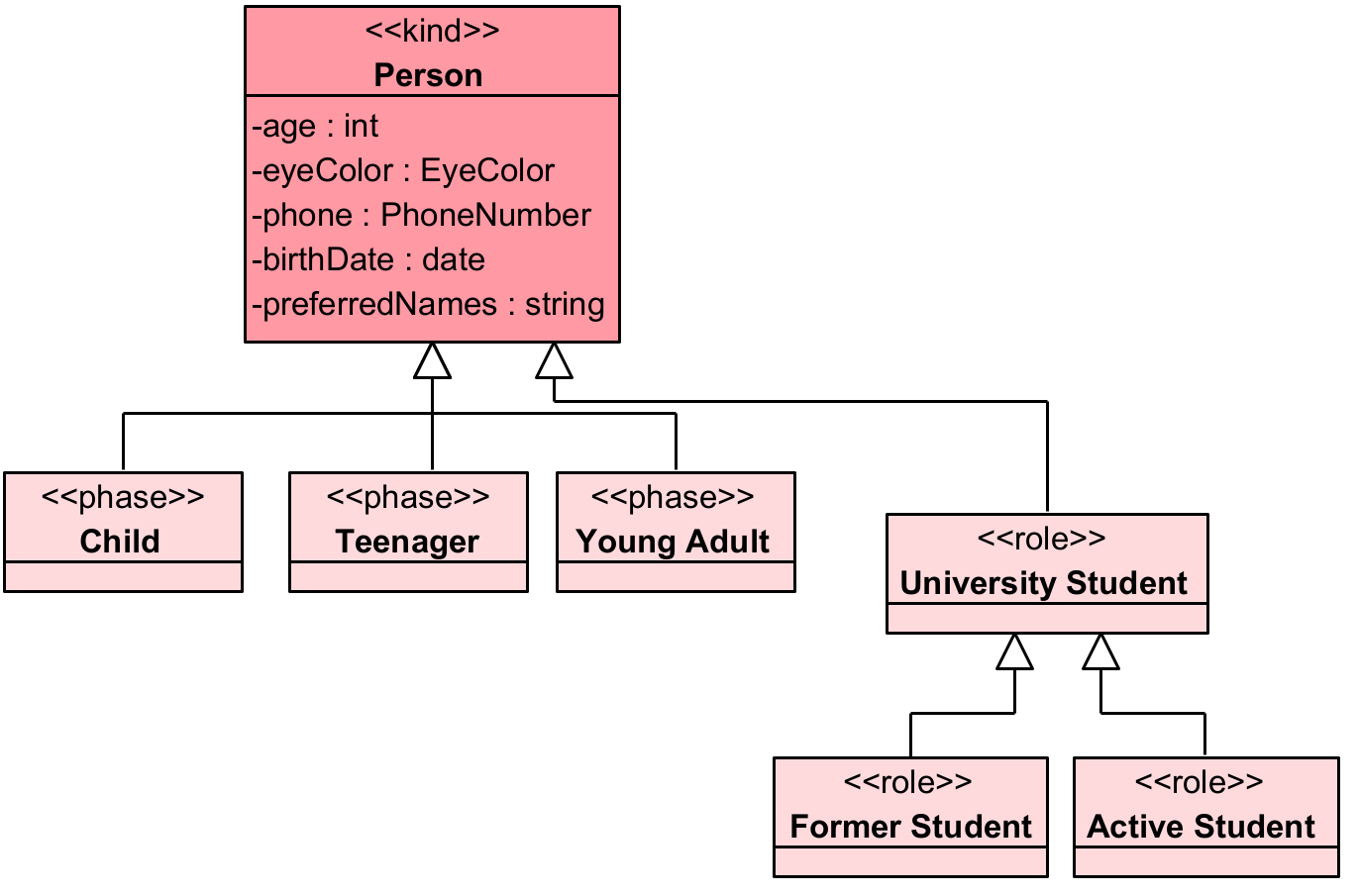
Tonto class declarations use OntoUML stereotypes as keywords:
package university.people

kind Person

phase Child specializes Person
phase Teenager specializes Person
phase Adult specializes Person

role UniversityStudent specializes Person
role FormerStudent specializes UniversityStudent
role ActiveStudent specializes UniversityStudent
kind Person provides the identity principle. phase and role declarations inherit identity through specialization.
Add datatypes and enums
Tonto includes built-in datatypes: string, number, boolean, date, time, and datetime.
Define custom datatypes and enums when the domain needs them:
datatype PhoneNumber {
  countryCode: string [1]
  bodyNumber: string [1]
}

datatype Integer specializes number

enum EyeColor {
  Blue,
  Green,
  Brown,
  Black
}
Add attributes
Attributes are declared inside class or datatype bodies:
kind Person {
  name: string [1]
  preferredNames: string [1..*] { ordered }
  age: number [1] { derived }
  birthDate: date [1] { const }
  eyeColor: EyeColor [0..1]
  phoneNumber: PhoneNumber [0..*]
}
Cardinality defaults to one when omitted, but documenting it explicitly helps reviewers understand the model.
Add labels and descriptions
Use multilingual documentation blocks to make the model easier to publish, review, and generate:
kind Person {
  label {
    @en "Person"
    @pt-br "Pessoa"
  }

  description {
    @en "A human being considered as an individual."
    @pt-br "Um ser humano considerado como individuo."
  }

  name: string [1]
}
Add relations
External relations begin with the optional relation stereotype and the relation keyword:
@mediation relation Enrollment [1] -- enrolls -- [1] UniversityStudent
Internal relations are declared inside a class body. The enclosing class is the source:
kind University {
  @componentOf [1] <>-- hasDepartments -- [1..*] Department
}

kind Department
Add a generalization set
Use the short syntax when the set only needs a general and specifics:
disjoint complete genset PersonLifePhases where Child, Teenager, Adult specializes Person
Use the block syntax when you need an explicit categorizer:
type EnrollmentStatus

disjoint complete genset StudentStatus {
  general UniversityStudent
  categorizer EnrollmentStatus
  specifics FormerStudent, ActiveStudent
}
Validate and generate
From the project root:
tonto-cli validate .
tonto-cli generate .
tonto-cli plantuml .
Continue with project structure to understand how Tonto discovers files and outputs generated artifacts.